![email-signature-anytime-logo-1.png]](https://knowledgebase.anytimebooking.co.uk/hs-fs/hubfs/email-signature-anytime-logo-1.png?height=42&name=email-signature-anytime-logo-1.png)
💡 What is 2FA?
2-Factor Authentication requires two pieces of information to log in:
-
Something you know – your password
-
Something you have – a one-time code sent via email
This combination makes it much harder for anyone else to access your account.
🔧 How to Enable 2FA
This is something we need to switch on for you (once it is enabled, we highly recommend leaving it this way).
Before we enable 2FA, please make sure that every user has a valid email address saved in their user profile. The verification code is sent via email, so 2FA will not work without this.
Please drop us an email at support@anytimebooking.co.uk
*Please note, 2FA is enabled on an account-by-account basis and will apply to all users once it is switched on.*
🔐 Logging In with 2FA
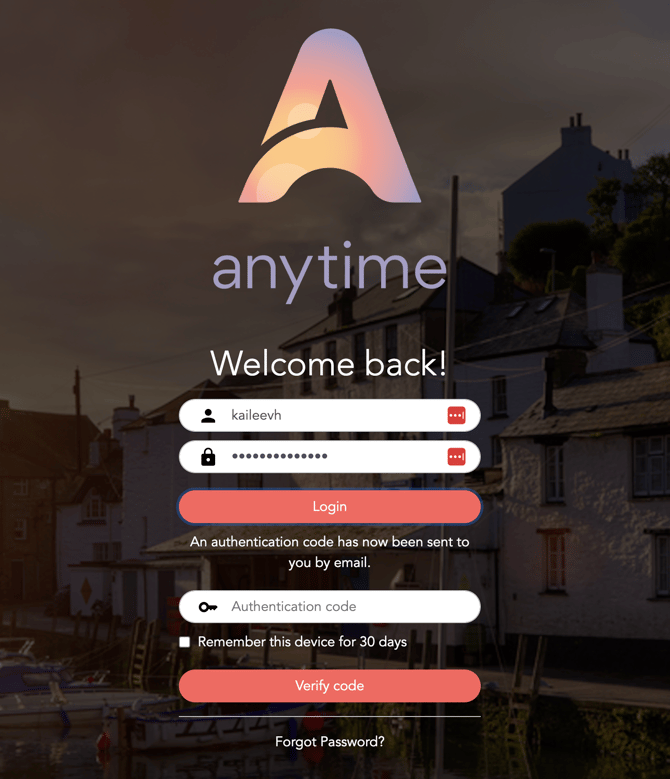
After entering your password, we’ll ask for your verification code:
-
Locate the email with the verification code from Anytime
-
Go back to the login page, enter the code and click 'verify code'
-
You will be signed in
📷 Example of the 2FA login screen:
🔁 “Remember me for 30 days”
When logging in, you’ll see an option to “Remember this device for 30 days”.
If you tick this box after entering your 2FA code, you won’t be asked for another code again for 30 days — as long as you’re using the same device and browser, and you haven’t cleared your cache/cookies.
This makes signing in faster, while still keeping your account secure.