![email-signature-anytime-logo-1.png]](https://knowledgebase.anytimebooking.co.uk/hs-fs/hubfs/email-signature-anytime-logo-1.png?height=42&name=email-signature-anytime-logo-1.png)
Setting up Access Worldpay for Anytime
To connect your Access Worldpay account with Anytime, you'll need to provide API credentials and configure a webhook.
Option 1: Grant temporary dashboard access
You can grant the Anytime team temporary access to your Worldpay Dashboard so we can complete the setup on your behalf.
Option 2: Send your API credentials
If you would prefer not to grant access, you can generate your API credentials yourself.
- Log in to your Worldpay Dashboard.
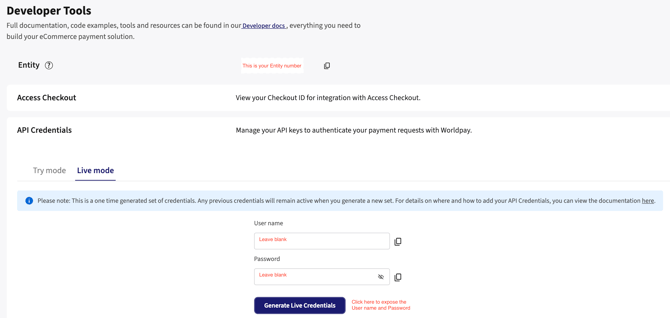
- From the left-hand menu, select Developer Tools.
- Click API Credentials.
- Select Generate Live Credentials (you can not add anything to the username or password)
- Copy the following details:
- User name
- Password
- Send these credentials to the Anytime team, along with your Entity .
The locations of these settings are shown in the screenshot below.
Configure the webhook
To ensure payments are automatically marked as paid against bookings in Anytime, you'll also need to create a webhook.
- Scroll down to the Webhooks section.
- Create a new webhook.
- In the Address field, enter the appropriate URL based on your Anytime account:
https://(your-account-name).anytimebooking.eu/worldpay3/callback/
If your Anytime URL contains .sb., use:
https://(your-account-name).sb.anytimebooking.eu/worldpay3/callback/
Replace (your-account-name) with the account name shown in your Anytime URL.
Once this webhook has been created, successful payments made through Worldpay will automatically update the corresponding booking in Anytime and mark it as Paid.
MOTO payments are not supported