![email-signature-anytime-logo-1.png]](https://knowledgebase.anytimebooking.co.uk/hs-fs/hubfs/email-signature-anytime-logo-1.png?height=42&name=email-signature-anytime-logo-1.png)
The Seasonal Unit tab allows you to create date-specific settings at unit level that temporarily override the property's global configuration.
This feature can be used to adjust:
- Occupancy limits (Online)
- Occupancy limits (Admin Area)
- Party members included in the price
- Balance payable due date
- Balance payable email reminder date
Seasonal settings are useful for managing different booking conditions during peak periods, holidays, special events, or any date range that requires different rules from the standard unit settings.
Important: All fields must be completed when creating a seasonal setting. Once active, the seasonal band will override the global settings for the selected date range.
Please ask a member of our support team to turn this feature on for you.
Creating a Seasonal Setting
Select New Seasonal Settings to open the seasonal configuration window.
Seasonal Settings Screen:
The following fields must be completed:
| Field | Description |
|---|---|
| Date From | Start date for the seasonal period. |
| Date To | End date for the seasonal period. |
| Occupancy (Online) | Maximum occupancy displayed and available on the online booking engine. |
| Occupancy (Admin Area) | Maximum occupancy available for bookings made through the administration area. |
| Party Members Inclusive in Price | Number of guests included within the standard price before additional guest charges apply. |
| Balance Payable (Days Before Arrival) | Number of days before arrival that the remaining balance becomes due. |
| Balance Payable Email (Days Before Arrival) | Number of days before arrival that the balance reminder email is sent. |
After completing all fields, select Add to save the seasonal setting.
Example Seasonal Band
The example below shows a seasonal band configured between 18/06/26 and 30/06/26.
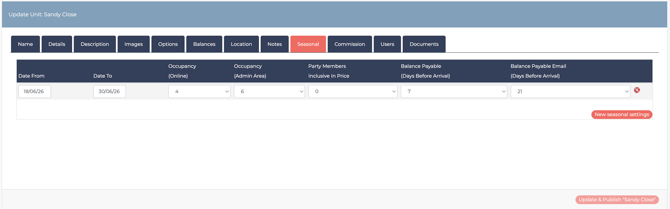
During this date range, these values will take precedence over the unit's standard/global settings.
Key Notes
- Seasonal settings are configured at Unit Level.
- Every field must be completed before the seasonal setting can be added.
- Seasonal bands only apply between the selected Date From and Date To dates.
- When a seasonal band is active, it overrides the global settings for that unit for that specified date range.When there isn't a seasonal band the global option will be used.
- Multiple seasonal bands can be created to support different trading periods throughout the year.