![email-signature-anytime-logo-1.png]](https://knowledgebase.anytimebooking.co.uk/hs-fs/hubfs/email-signature-anytime-logo-1.png?height=42&name=email-signature-anytime-logo-1.png)
Length of Stay (LOS) pricing allows you to set different rates based on the number of nights a guest stays.
How to set it up
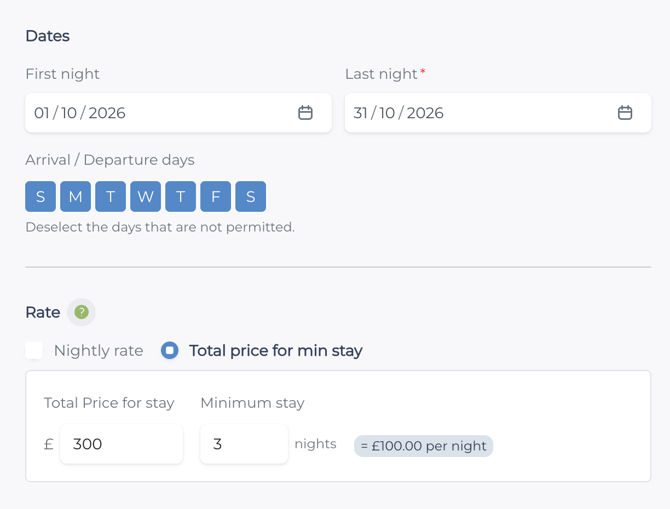
Firstly enter the following:1. Dates
2. Arrival/Departure days
3. Rate (nightly or total)
4. Minimum number of nights
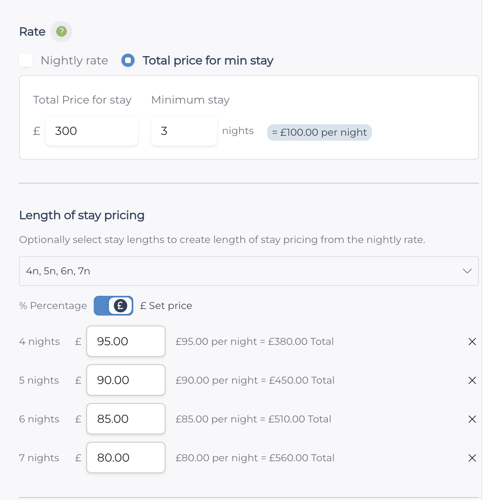
Under Length of stay pricing, select the stay lengths you want to price, e.g. 4, 5, 6 or 7 nights.
Choose how you want to price longer stays:
-
- Set price (default) – enter a fixed nightly price.
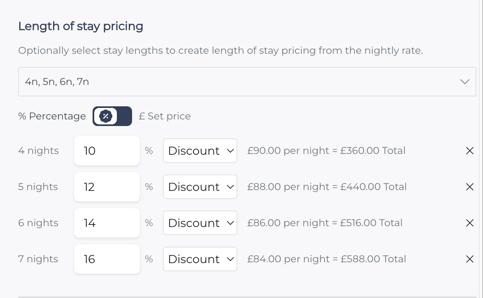
- Percentage – apply a discount or increase to the nightly rate.
- Set price (default) – enter a fixed nightly price.