---
title: How to Publish Rates - LITE
description: A guide to help make any rate changes live
---
[Skip to content](https://knowledgebase.anytimebooking.co.uk/anytime-lite/how-to-publish-rates#main-content)
[Contact Support](https://knowledgebase.anytimebooking.co.uk/anytime-lite/kb-tickets/new?hsLang=en-gb)
[](https://knowledgebase.anytimebooking.co.uk/anytime-lite?hsLang=en-gb)
Open main navigation
Close main navigation
- [Contact Support](https://knowledgebase.anytimebooking.co.uk/anytime-lite/kb-tickets/new)
- [Contact Support](https://knowledgebase.anytimebooking.co.uk/anytime-lite/kb-tickets/new)
[Contact Support](https://knowledgebase.anytimebooking.co.uk/anytime-lite/kb-tickets/new?hsLang=en-gb)
Welcome to the Anytime LITE knowledge base
- There are no suggestions because the search field is empty.
1. [Anytime LITE Knowledge Base](https://knowledgebase.anytimebooking.co.uk/anytime-lite?hsLang=en-gb)
2. [Pricing in LITE](https://knowledgebase.anytimebooking.co.uk/anytime-lite/pricing-in-lite?hsLang=en-gb)
# How to Publish Rates - LITE
## Once you have added or made changes to your rates, the changes need to be published before they become available online.
The new Rates area gives you two easy ways to publish your changes:
- From the **Rates Dashboard**
- Directly from the **Rates tab**
### 1. Publish from the Rates Dashboard
Go to **Rates** from the left-hand navigation menu.
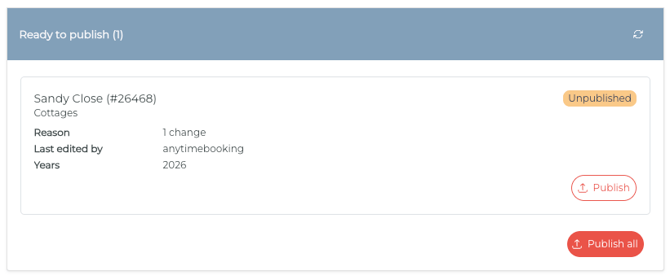
The **Dashboard** tab will show a **Ready to publish** section containing any units that have unpublished rate changes.
Only units with unpublished changes will appear here.
For each unit, you can see how many changes are waiting to be published.
### Publish an individual unit
If you only want to publish one unit, click the **Publish** button within that unit's record.
This allows you to publish units individually without publishing all outstanding changes.
### Publish all
If you want to publish all outstanding changes, click **Publish All**.
This will publish all units currently listed as ready to publish.
Once the publishing process has started, the units will be removed from the **Ready to publish** section.
---
### 2. Publish from the Rates tab
You can also publish changes directly from the **Rates** tab.
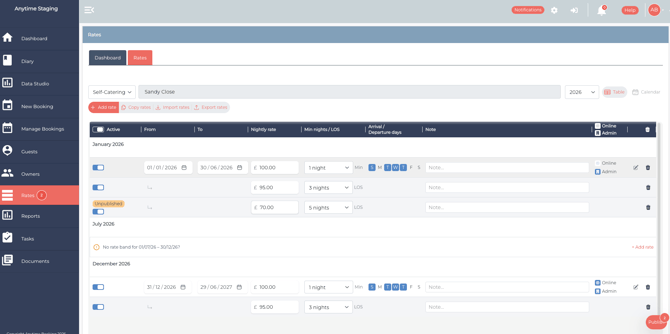
When a rate has been changed but not yet published, the **Publish** button will appear at the bottom right of the page with a number showing how many records are waiting to be published.
For example:
**Publish 2**
means there are two records waiting to be published.
Select **Publish** to open the publishing panel.
### 
### Publishing panel
The publishing panel shows all of the records that are currently waiting to be published.
You can:
- **Publish individual records** using the Publish button next to the relevant unit.
- Select **Publish All** at the top to publish everything waiting.
Once published, the records will be cleared from the list.
---
### Allow time for publishing
After publishing your rates, allow approximately 1–2 minutes for the changes to process.
The publishing takes place in the background, so you do not need to remain on the Rates page while this happens.
You can continue making other changes or move to another area of your Anytime account while the publishing process completes.
Once processed, your updated rates will be available on your **calendars and search widgets**, where these are used on your website.
>
- [User Guides & Videos](https://knowledgebase.anytimebooking.co.uk/anytime-lite/user-guides-videos?hsLang=en-gb)
- [Manage Your Settings](https://knowledgebase.anytimebooking.co.uk/anytime-lite/manage-your-settings?hsLang=en-gb)
- [Connections](https://knowledgebase.anytimebooking.co.uk/anytime-lite/connections?hsLang=en-gb#main-content)
- [Airbnb](https://knowledgebase.anytimebooking.co.uk/anytime-lite/connections?hsLang=en-gb#airbnb)
- [Pricing in LITE](https://knowledgebase.anytimebooking.co.uk/anytime-lite/pricing-in-lite?hsLang=en-gb)
[](https://www.anytimebooking.co.uk)
The base of all knowledge
[mailto:support@anytimebooking.co.uk](mailto:support@anytimebooking.co.uk)
Copyright © 2026, Anytime Booking